Try "play", "mute vocals", or describe music
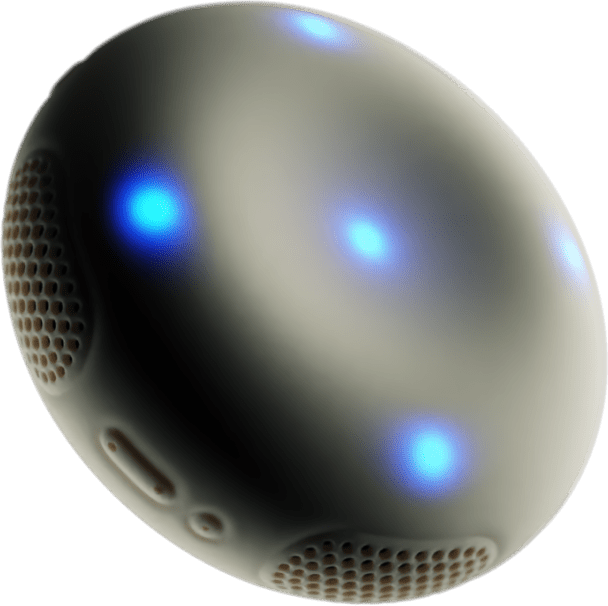
Stem2
Play any song. Hear every part.
A 360° portable speaker that plays your music, and lets you reshape it. Pair with StemFM to remix, crossfade, and discover.
Colour: Boulder
Size: 16.7cm × 16.7cm × 6.7cm
In the box:
Stem2
Pillow bag
QR code microfiber cloth
1.5m USB-C charging cable
1 year StemFM access
StemFM subscription included free for 1 year.
40Hz–20kHz frequency range
64GB storage
Bluetooth 5.2 + Wi-Fi
USB-C fast charge
20–30 hour battery
Tracked delivery
30-day returns
1-year limited warranty

Audio & Mixing
Speakers
Speakers', 360° omnidirectional speaker, 40Hz–20kHz frequency range, custom DSP engine
Stem mix
Speakers', Songs delivered as 4 stems (vocals, drums, bass, instruments), ready to mix in real time
Mixing
Per-stem volume control, live looping, tempo adjustment, cross-track blending
Controls
Play/pause, Bluetooth pairing, skip, stem controls
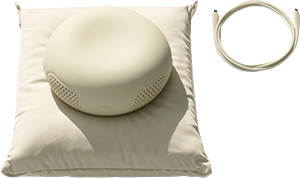
In the Box
Included
Stem2, pillow bag, QR code microfiber cloth, 1.5m USB-C charging cable, 1 year StemFM access
StemFM
Millions of songs. Millions of ways to hear them. Millions of ways to find new ones.
FAQs
The stem controls on your Stem2 are on the top face of the speaker, in a ring around the centre. There are four stem keys, each with its own LED; each key is linked to that stem of the track.
Layout
- Top: vocals
- Bottom: drums
- Left: bass
- Right: instruments
When StemFM is active, the LEDs show that the stem controls are live. Each LED reflects the current state of that stem (on, off, or isolated).
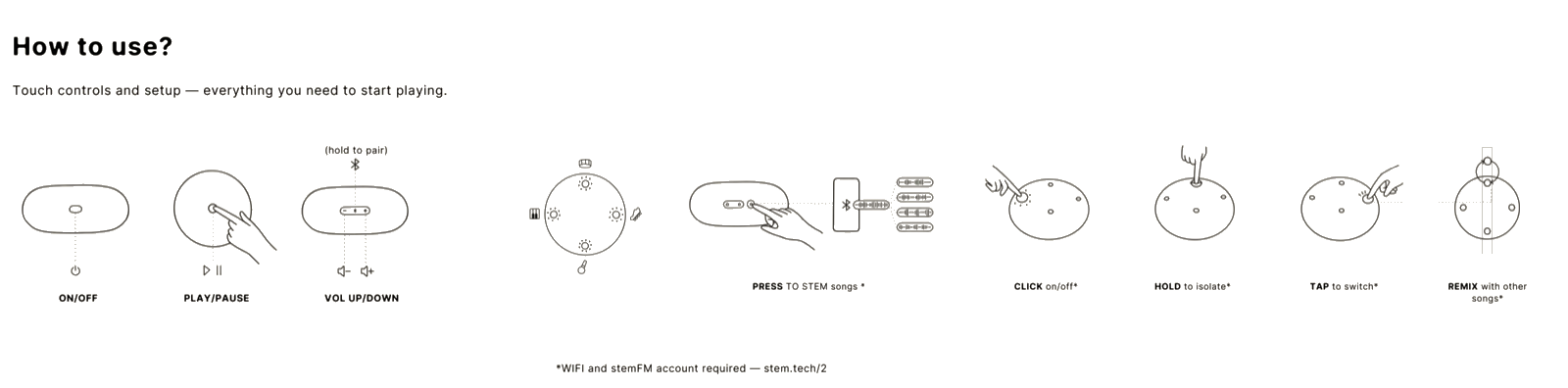
Stems are the individual parts of a song: vocals, drums, bass, and instruments. Stem2 gives you complete control over how you listen to and remix these stems. The stem controls are on the top face of Stem2, arranged in a ring around the centre:
- Top: vocals
- Bottom: drums
- Left: bass
- Right: instruments
When StemFM is active, the LEDs show the stem controls are live. Each LED reflects the current state of that stem (on, off, or isolated).
Use the stem controls to shape a single track or to mix two tracks together. You can use them on your own stems that you upload to the player without a StemFM subscription. A StemFM account is required for the catalogue, for mixing two catalogue tracks together, for Bluetooth splits when that title is in the catalogue, and for downloads from StemFM.
- Tap or click a stem key: turn that stem on or off
- Hold a stem key: isolate only that stem
- Release: return to the full track
- Click a stem key: turn that stem on or off in the mix
- Tap a stem key: swap that stem with the matching stem from the second track
- Hold a stem key: isolate that stem
- Release: return to the full mix
All of these changes happen live while the track is playing.
Your own stems on the player: upload them and use the stem keys without a StemFM subscription. For StemFM catalogue music, you need a StemFM account. Then the stem controls work in situations such as:
- Online: use the stem keys on tracks in the StemFM catalogue while the speaker is on Wi-Fi
- Offline: use the keys on catalogue tracks you have downloaded onto the speaker from your StemFM account
- Bluetooth: use the StemFM button to split the track on the speaker when that title is available in the StemFM catalogue
Top centre: tap for play/pause.
Edge around the speaker: Bluetooth pairing; StemFM button; skip track; power; volume.
Without a StemFM subscription, Stem2 works as a Bluetooth speaker: pair it with your phone or another source, use power, volume, play/pause, and Bluetooth pairing, and play the full mix from any audio app you send over Bluetooth. You can also upload your own stems to the player and use the stem keys on that music without a StemFM subscription.
You do not get StemFM catalogue access, stem-key control of catalogue tracks streamed or downloaded through StemFM, downloads of StemFM-managed tracks for offline catalogue playback, or catalogue matching from streaming apps for on-speaker remixing. Those need a StemFM account.
1. Visit or scan the QR code in the box
2. Follow the link steps to mirror audio and controls
3. Your Stem2 will sync with your StemFM account
4. Your liked music syncs automatically to your device
Supported on:
- Mac
- Windows
- Linux
- Android
Linked benefits: Your liked music syncs to your device. New Stem tracks and liked music appear in your StemFM liked set. Manage updates, Wi‑Fi, and settings from the panel.
Settings include: Manual firmware update, sync toggle, stem toggle, Wi‑Fi management, factory reset, device info and battery, account re‑linking. Best on 5GHz.
iOS support is coming through the app.
- Center LED (Play/Pause): Tap once
- Forward/Back buttons: Click for next/previous track. Hold during local playback to fast-forward or rewind
- Bluetooth Button: Hold to disconnect. Tap once to reconnect to the last device
Access the settings panel in StemFM to control firmware updates, Wi-Fi management, stem toggle, sync preferences, factory reset, device info, and battery status. Best performance on 5GHz Wi-Fi.
From StemFM you can:
- sync liked music
- manage Wi-Fi
- update firmware
- reconnect your account
- factory reset the device
- check battery and device info
- enable or disable stem controls
5GHz Wi-Fi is recommended for best performance.
Instruction manual: ·